The leads list
A table of your leads with search, filters, saved views and the columns you choose. It stays quick with lakhs of leads.
Open Leads in the menu. The list shows a page of leads at a time, newest first. Search is at the top, with a few filters beside it and a Filters button for the rest.
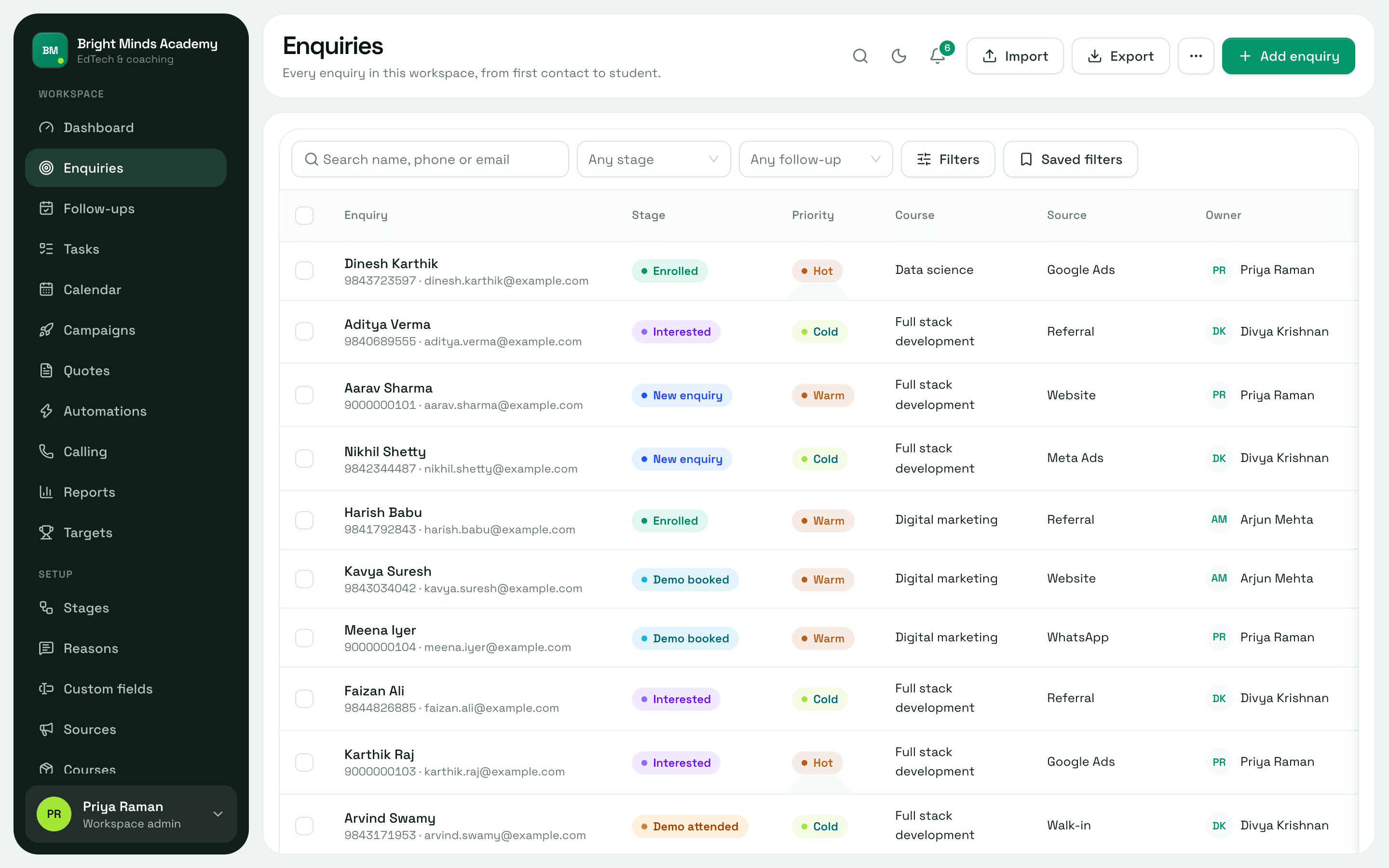
What is on the screen
- Search box and quick filters (stage, follow-up, owner) in the toolbar.
- Filters and Saved filters buttons.
- The table, with the gear in the last column's header to choose columns.
- Under the table: the page controls and a count. Past 10,000 matches it says “10,000+”: narrow with a filter to see the exact number.
- Tick boxes on the left for bulk actions.
In this section
SearchFind a lead by name, phone number or email as you type.FiltersNarrow the list by stage, owner, source, dates and more, from a one-click filter to a nested AND / OR rule.Saved filtersKeep a combination of filters under a name, and share it with your team.ColumnsShow, hide and reorder the table's columns. Your choice is saved for you.Using the list on a phoneOn a phone each lead is a card: tap to call or message.
Read next
Something missing or unclear? Tell us and we will fix this page.